IA / Posenet
Pointer, pointer
Posenet
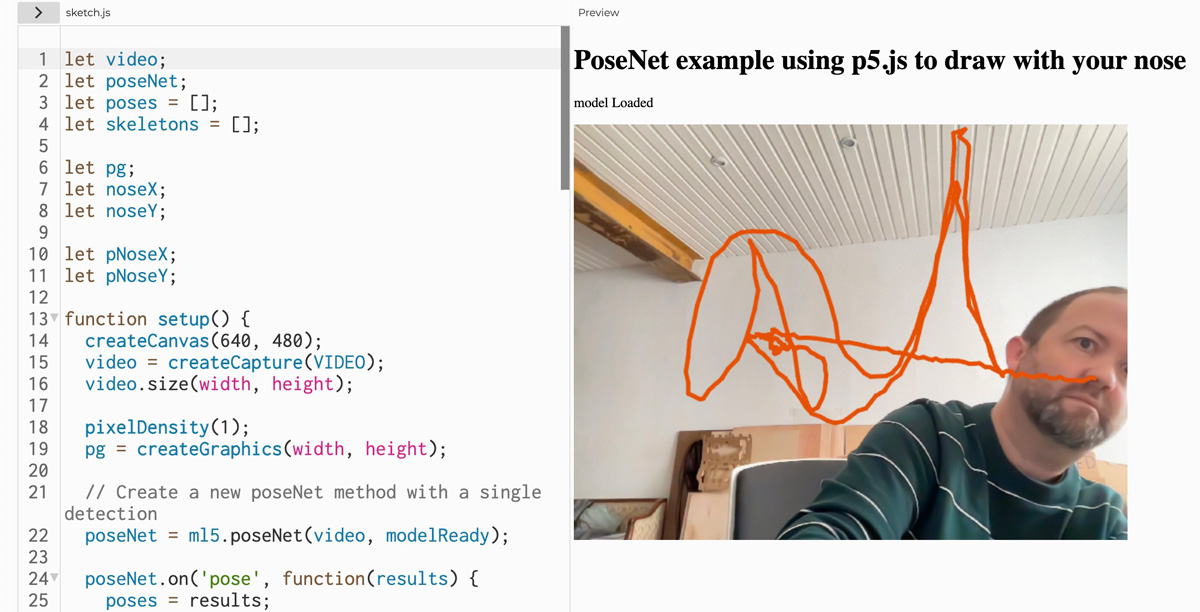
Ci-dessous un lien vers un sketch d’exemple de ce qu’il est possible de faire, dans la navigateur, pour récupérer la position des différents points de votre visage et votre corps (via la webcam).
Dessinez avec votre nez
Section intitulée « Dessinez avec votre nez »let video;let poseNet;let poses = [];let skeletons = [];
let pg;let noseX;let noseY;
let pNoseX;let pNoseY;
function setup() { createCanvas(640, 480); video = createCapture(VIDEO); video.size(width, height);
pixelDensity(1); pg = createGraphics(width, height);
// Create a new poseNet method with a single detection poseNet = ml5.poseNet(video, modelReady);
poseNet.on('pose', function(results) { poses = results; });
// Hide the video element, and just show the canvas video.hide();}
function draw() { image(video, 0, 0, width, height);
image(pg, 0, 0, width, height);
// We can call both functions to draw all keypoints and the skeletons drawKeypoints(); //drawSkeleton();}
// A function to draw ellipses over the detected keypointsfunction drawKeypoints() { // Loop through all the poses detected for (let i = 0; i < min(poses.length, 1); i++) { // For each pose detected, loop through all the keypoints for (let j = 0; j < poses[i].pose.keypoints.length; j++) { // A keypoint is an object describing a body part (like rightArm or leftShoulder) let keypoint = poses[i].pose.keypoints[j]; // Only draw an ellipse is the pose probability is bigger than 0.2 if (keypoint.score > 0.2) { if (j == 0) { noseX = keypoint.position.x; noseY = keypoint.position.y;
pg.stroke(230, 80, 0); pg.strokeWeight(5); pg.line(noseX, noseY, pNoseX, pNoseY);
pNoseX = noseX; pNoseY = noseY; } } } }}
// A function to draw the skeletonsfunction drawSkeleton() { // Loop through all the skeletons detected for (let i = 0; i < poses.length; i++) { // For every skeleton, loop through all body connections for (let j = 0; j < poses[i].skeleton.length; j++) { let partA = poses[i].skeleton[j][0]; let partB = poses[i].skeleton[j][1]; stroke(255, 0, 0); line(partA.position.x, partA.position.y, partB.position.x, partB.position.y); } }}
// The callback that gets called every time there's an update from the modelfunction gotPoses(results) { poses = results;}
function keyPressed() { pg.clear();}
function modelReady() { select('#status').html('model Loaded');}